If you've ever pasted a long article into ChatGPT and asked for a summary—only to receive a generic response that missed the most important ideas—you've experienced one of the biggest frustrations of using AI.
Many people assume the solution is to write longer prompts:
"Please act as an expert researcher and provide a highly detailed, comprehensive, and accurate summary while making sure not to miss any important information."
Sometimes that works. Often, it doesn't.
The problem isn't that your prompt is too short. It's usually that it's too ambiguous.
ChatGPT performs best when it clearly understands four things:
- What task you want it to perform
- What information matters most
- What constraints it should follow
- What the final output should look like
This guide explains the prompting techniques that consistently improve ChatGPT's responses—not because they are "magic words," but because they reduce ambiguity and give the model clearer instructions.
Why Generic Prompts Produce Generic Answers
Large language models generate text by predicting what words are most likely to come next based on your prompt and the conversation so far.
When your request is broad, there are countless reasonable ways to answer it.
For example:
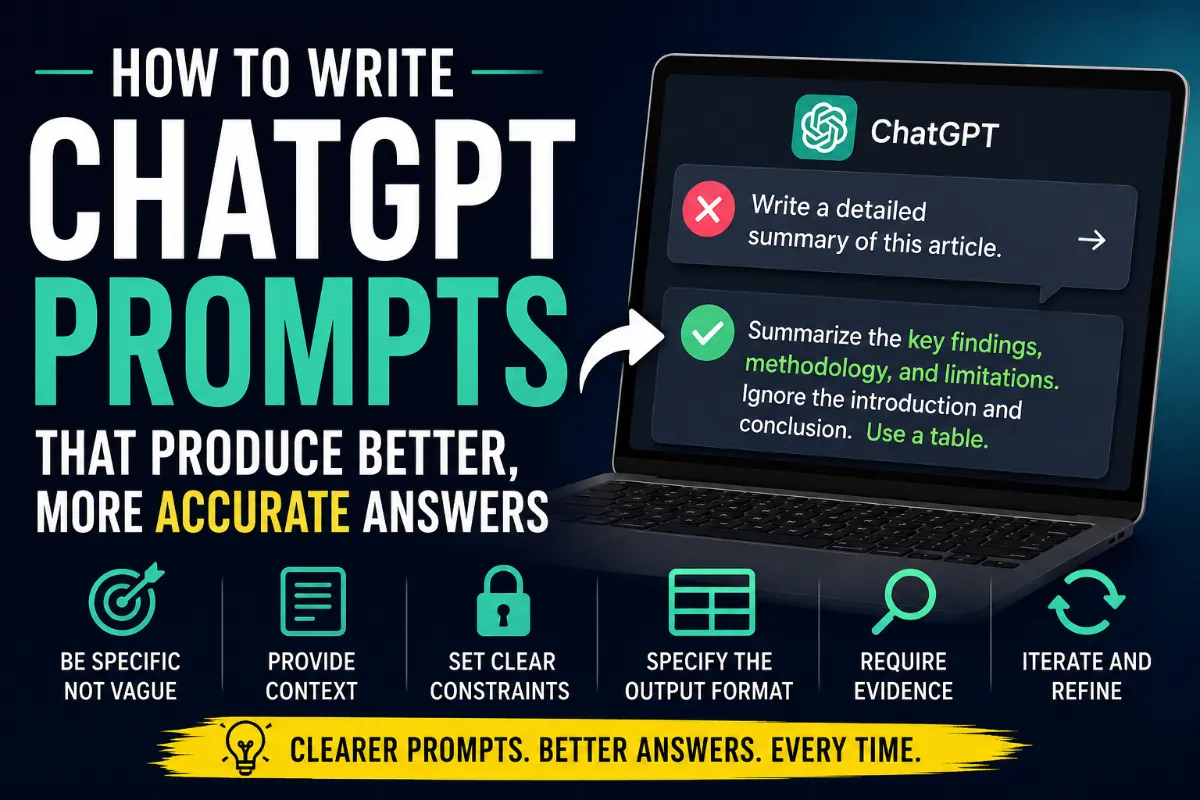
Summarize this article.
What kind of summary?
- Short or long?
- For beginners or experts?
- Focused on methodology or conclusions?
- Objective or opinionated?
Since none of that is specified, ChatGPT has to make educated guesses. Those guesses often lead to safe, average responses that satisfy most users but rarely feel tailored to your needs.
Instead of adding vague adjectives like "very detailed" or "comprehensive," specify exactly what matters.
Instead of:
Write a detailed summary.
Try:
Summarize the article for a software engineer. Focus on the main argument, supporting evidence, limitations, and practical recommendations. Ignore anecdotes and introductory material. Present the result as a Markdown table.
The second prompt doesn't just ask for more detail—it removes ambiguity.
Specific Instructions Beat Strong Adjectives
Many prompts rely heavily on words like:
- Detailed
- Professional
- Comprehensive
- Thorough
- High quality
These words aren't useless, but they're open to interpretation.
Compare these two prompts:
Poor
Write a comprehensive review of this research paper.
Better
Review the paper by covering:
- The research question
- The methodology
- The main findings
- Limitations
- Practical implications
- Potential future research
Keep each section under 150 words.
The second prompt tells ChatGPT exactly what "comprehensive" means.
Give the Model Context Before Asking for Answers
The quality of a response depends not only on the prompt but also on the context you provide.
Imagine asking:
Explain Kubernetes.
Now compare it with:
I'm a backend developer with five years of experience using Docker but no production experience with Kubernetes. Explain Pods, Deployments, and Services by comparing them to Docker concepts I already understand.
The second prompt allows ChatGPT to tailor its explanation to your existing knowledge instead of starting from scratch.
Whenever possible, include information such as:
- Your experience level
- Your goal
- Your audience
- Any constraints you're working under
Separate Instructions from Source Material
One simple habit that improves reliability is separating your instructions from the text you want ChatGPT to analyze.
Instead of mixing everything together, clearly label each section.
<instructions>
Summarize only the methodology and findings.
Ignore the introduction and conclusion.
Return the result as a Markdown table.
</instructions>

<source>
(Paste the article here.)
</source>
Clear structure makes it easier for the model to distinguish between your instructions and the content it should analyze.
You don't have to use XML tags specifically. Markdown headings, separators, or labeled sections work just as well.
Use Constraints to Shape the Output
One of the simplest ways to improve responses is by telling ChatGPT what not to do.
For example:
Task:
Write an introduction for our new software.

Constraints:
- Don't mention AI.
- Don't apologize.
- Don't use buzzwords.
- Avoid phrases like "In today's fast-paced world."
- Start immediately with the product's main benefit.
Constraints reduce the range of acceptable responses, making the output more consistent with your expectations.
They're often more effective than simply saying "write better."
Always Specify the Output Format
If you don't tell ChatGPT what format you want, it chooses one for you.
That choice isn't always what you had in mind.
Instead of:
Analyze this report.
Try:
Return your analysis using this structure:
- Executive Summary (100 words maximum)
- Three Key Findings
- Supporting Evidence
- Risks
- Recommended Next Steps
Explicit formatting makes responses easier to read, compare, and reuse.
For Accuracy, Ask for Evidence Instead of Confidence
One common mistake is asking ChatGPT to verify its own work.
Check your answer and fix any mistakes.
Sometimes this helps.
But if the model has already made an incorrect assumption, simply asking it to "double-check" doesn't guarantee it will discover the error.
A more reliable approach is to ground the response in source material.
For example:
For every claim in your summary, identify the sentence or paragraph from the source that supports it. Remove any claim that cannot be supported by the text.
This encourages ChatGPT to verify its answer against the information you provided instead of relying solely on its previous response.
Long Documents Require Better Instructions
Research has shown that language models can struggle with information buried in the middle of very long documents.
When working with lengthy reports, studies, or books:
- State your instructions before the source material.
- Clearly separate instructions from content.
- Tell ChatGPT exactly which sections deserve the most attention.
- If possible, break extremely long documents into logical chunks.
For example:
Focus only on the methodology, statistical analysis, and limitations. Ignore acknowledgments, appendices, and introductory background.
Specific instructions help the model prioritize the parts that matter most.
Good Prompting Is Usually Iterative
Many users expect one perfect prompt to produce one perfect answer.
In practice, the best results often come from a short conversation.
A useful workflow looks like this:
- Generate an initial draft.
- Ask ChatGPT to critique its organization.
- Revise unclear sections.
- Verify important claims against your source material.
- Adjust formatting for your final audience.
Treat ChatGPT as a collaborative editor rather than a one-shot answer machine.
A Simple Prompt Template That Works for Almost Everything
You don't need complicated "master prompts" filled with dozens of rules.
Most tasks can be handled with five simple sections.
Task:
What should ChatGPT accomplish?

Context:
What background information does it need?

Constraints:
What should it include or avoid?

Output:
What should the final answer look like?

Verification (Optional):
How should it confirm accuracy?
Here's an example:
Task:
Summarize the attached research paper.

Context:
The audience is product managers with no statistical background.

Constraints:
Focus only on methodology, findings, and limitations.
Avoid technical jargon whenever possible.

Output:
A Markdown table with three columns:
Topic | Summary | Practical Impact

Verification:
Support each finding with evidence from the paper.
Common Prompting Myths
| Myth | Reality |
|---|---|
| Longer prompts are always better. | More context helps only when it's relevant and well organized. |
| Saying "be detailed" guarantees depth. | Specific instructions are usually more effective than broad adjectives. |
| ChatGPT can always fact-check itself. | Grounding responses in source material is generally more reliable. |
| There are secret prompt words that unlock perfect answers. | Clear goals, constraints, context, and formatting matter far more than magic phrases. |
| One perfect prompt solves every problem. | Most high-quality results come from refining prompts over multiple iterations. |
The Key Principle Behind Better Prompting
The best prompts aren't clever—they're clear.
Instead of searching for secret formulas or viral prompt hacks, focus on reducing ambiguity.
Tell ChatGPT:
- Exactly what you're trying to accomplish.
- Who the answer is for.
- What information matters most.
- What should be excluded.
- How the final result should be formatted.
- How accuracy should be verified when it matters.
Those principles work across writing, programming, research, studying, business, and nearly every other use case.
Ultimately, better prompting isn't about learning magic keywords. It's about giving the model enough clarity to produce the answer you actually want.